Web Product Releases
Web 1.6.6
8 May 2026
Technical update for MTD
Technical update for MTD
Fixes
Minor technical update required for HMRC MTD.
Technical update for MTD
Fixes
Minor technical update required for HMRC MTD.
Web 1.6.5
7 May 2026
Master Views and Landlord-Tenant Messaging
Master Views and Landlord-Tenant Messaging
What’s included
Three new landlord master views:
Documents matrix — see every document across every property, tenancy, tenant, and contact in one grid. Click cells to share or unshare, then review a summary of who'll be added or removed before saving.
Compliance matrix — landlord-wide view of every compliance task across your portfolio, with quick links straight to the task on each property.
Payments matrix — your full rent timeline at a glance: tenancies down the side, months across the top, with today highlighted and outstanding-only filtering.
Messaging communication center:
New /messages area with a side-by-side conversation list and thread view.
Start new conversations from anywhere via a floating button.
Archive conversations instead of deleting them, with a collapsible archived section.
"Message about this issue" button on maintenance reports opens a conversation tied to that report.
Messages widget now appears on the home screen for both landlords and tenants.
Smarter document sharing:
Per-recipient control: choose Off, Linked, or Shared for each tenant or contact and Auto share for whole properties or tenancies.
New consolidated sharing widget on the document detail page shows exactly who has access.
Fixes
Fixed a bug where clicking nav links could freeze the app after visiting Documents, Messages, or Compliance pages.
Tax-year debug link now visible whenever the panel is open.
Focus rings no longer linger after clicking with a mouse.
Master Views and Landlord-Tenant Messaging
What’s included
Three new landlord master views:
Documents matrix — see every document across every property, tenancy, tenant, and contact in one grid. Click cells to share or unshare, then review a summary of who'll be added or removed before saving.
Compliance matrix — landlord-wide view of every compliance task across your portfolio, with quick links straight to the task on each property.
Payments matrix — your full rent timeline at a glance: tenancies down the side, months across the top, with today highlighted and outstanding-only filtering.
Messaging communication center:
New /messages area with a side-by-side conversation list and thread view.
Start new conversations from anywhere via a floating button.
Archive conversations instead of deleting them, with a collapsible archived section.
"Message about this issue" button on maintenance reports opens a conversation tied to that report.
Messages widget now appears on the home screen for both landlords and tenants.
Smarter document sharing:
Per-recipient control: choose Off, Linked, or Shared for each tenant or contact and Auto share for whole properties or tenancies.
New consolidated sharing widget on the document detail page shows exactly who has access.
Fixes
Fixed a bug where clicking nav links could freeze the app after visiting Documents, Messages, or Compliance pages.
Tax-year debug link now visible whenever the panel is open.
Focus rings no longer linger after clicking with a mouse.
Web 1.6.4
24 April 2026
Onboarding and HMRC Making Tax Digital
Onboarding and HMRC Making Tax Digital
What’s included
Refreshed onboarding - new look across the sign-up and login flows: split layout, brand colours, dark mode, and a testimonial panel. Sign-up and login now live at clean, dedicated URLs.
Calculators - 17 new calculators and checkers now available inside the web product.
Document activity - See your three most recent activity events at a glance, with a "See all" link to the full history.
Expired & revoked document landing page - Further improvements to the document landing page when someone opens a document that's no longer available.
Onboarding and HMRC Making Tax Digital
What’s included
Refreshed onboarding - new look across the sign-up and login flows: split layout, brand colours, dark mode, and a testimonial panel. Sign-up and login now live at clean, dedicated URLs.
Calculators - 17 new calculators and checkers now available inside the web product.
Document activity - See your three most recent activity events at a glance, with a "See all" link to the full history.
Expired & revoked document landing page - Further improvements to the document landing page when someone opens a document that's no longer available.
Web 1.6.3
17 April 2026
One-Time Document View
One-Time Document View
What’s included
One-time view landing page - Clearer landing page experience for recipients opening a document via a one-time secure link.
One-Time Document View
What’s included
One-time view landing page - Clearer landing page experience for recipients opening a document via a one-time secure link.
Web 1.6.2
8 April 2026
MTD Enhancements, Subscription Limits, and Maintenance Feature Updates
MTD Enhancements, Subscription Limits, and Maintenance Feature Updates
This minor release brings significant improvements to Making Tax Digital tooling, clearer subscription limit visibility, and several refinements to maintenance reporting, HMRC authentication, and compliance.
What’s included
MTD quarterly period management – You can now manage quarterly period types directly within the app, alongside new debug tooling for MTD configuration and HMRC API call recording with a built-in checklist, giving greater visibility into your tax submissions.
Subscription limit indicators – Subscription usage is now displayed with colour-coded pill badges, making it immediately clear where you stand against your plan limits at a glance.
Maintenance report improvements – Maintenance reports now support PDF download, and troubleshooting information is surfaced directly within the report view, making it easier to review and share the full picture of a reported issue.
HMRC authentication update – The HMRC OAuth flow now uses a popup window, preserving the application state in the background. The callback handler also manages popup closure more gracefully and displays connection status clearly.
Compliance refinement – Task reminders can now be filtered by compliance task state, giving you a more focused view of what requires attention.
Plans page update – The plans page has been refreshed and now draws limit data directly from the API, ensuring the information shown is always accurate and up to date.
Bug fixes and improvements – Property feature modal state is now preserved on save failure, the debug panel layout has been reorganised for clarity, and progress indicators have been updated to use API-driven colour values.
MTD Enhancements, Subscription Limits, and Maintenance Feature Updates
This minor release brings significant improvements to Making Tax Digital tooling, clearer subscription limit visibility, and several refinements to maintenance reporting, HMRC authentication, and compliance.
What’s included
MTD quarterly period management – You can now manage quarterly period types directly within the app, alongside new debug tooling for MTD configuration and HMRC API call recording with a built-in checklist, giving greater visibility into your tax submissions.
Subscription limit indicators – Subscription usage is now displayed with colour-coded pill badges, making it immediately clear where you stand against your plan limits at a glance.
Maintenance report improvements – Maintenance reports now support PDF download, and troubleshooting information is surfaced directly within the report view, making it easier to review and share the full picture of a reported issue.
HMRC authentication update – The HMRC OAuth flow now uses a popup window, preserving the application state in the background. The callback handler also manages popup closure more gracefully and displays connection status clearly.
Compliance refinement – Task reminders can now be filtered by compliance task state, giving you a more focused view of what requires attention.
Plans page update – The plans page has been refreshed and now draws limit data directly from the API, ensuring the information shown is always accurate and up to date.
Bug fixes and improvements – Property feature modal state is now preserved on save failure, the debug panel layout has been reorganised for clarity, and progress indicators have been updated to use API-driven colour values.
Web 1.6.1
26 March 2026
Compliance Paywall Fix
Compliance Paywall Fix
Fixes
Compliance paywall – Fixed the ability to display the paywall based on a paid or unpaid user status against a compliance task.
Compliance Paywall Fix
Fixes
Compliance paywall – Fixed the ability to display the paywall based on a paid or unpaid user status against a compliance task.
Web 1.6
24 March 2026
Reports, Maintenance Wizard, and Property Page Redesign
Reports, Maintenance Wizard, and Property Page Redesign
This release brings PDF report generation, a new guided maintenance reporting experience, further compliance improvements, and a significant redesign of the property page, moving from a tab-based layout to a cleaner widget-based view.
What’s included
PDF report generation – You can now generate and download PDF versions of your Income/Expense Statement and Breakdown Statement directly from the app, making it easier to share financial records with accountants or keep for your own files.
Maintenance Wizard – A new guided maintenance reporting flow walks through diagnosing the issue step by step before a report is submitted. The wizard also incorporates property features, giving more relevant context to each report.
Compliance V2 improvements – Further refinements to the compliance experience, including UI improvements throughout and the ability to mark tasks as not applicable with a recorded reason, useful for properties where certain requirements do not apply.
Property page redesign – The property page has moved from a tab-based layout to a widget-based design, surfacing the information most relevant to you more directly and making it easier to navigate your property at a glance.
Property features – Property features are now accessible via a dedicated modal and widget, with impact hints to help you understand how each feature may affect your compliance obligations or management tasks.
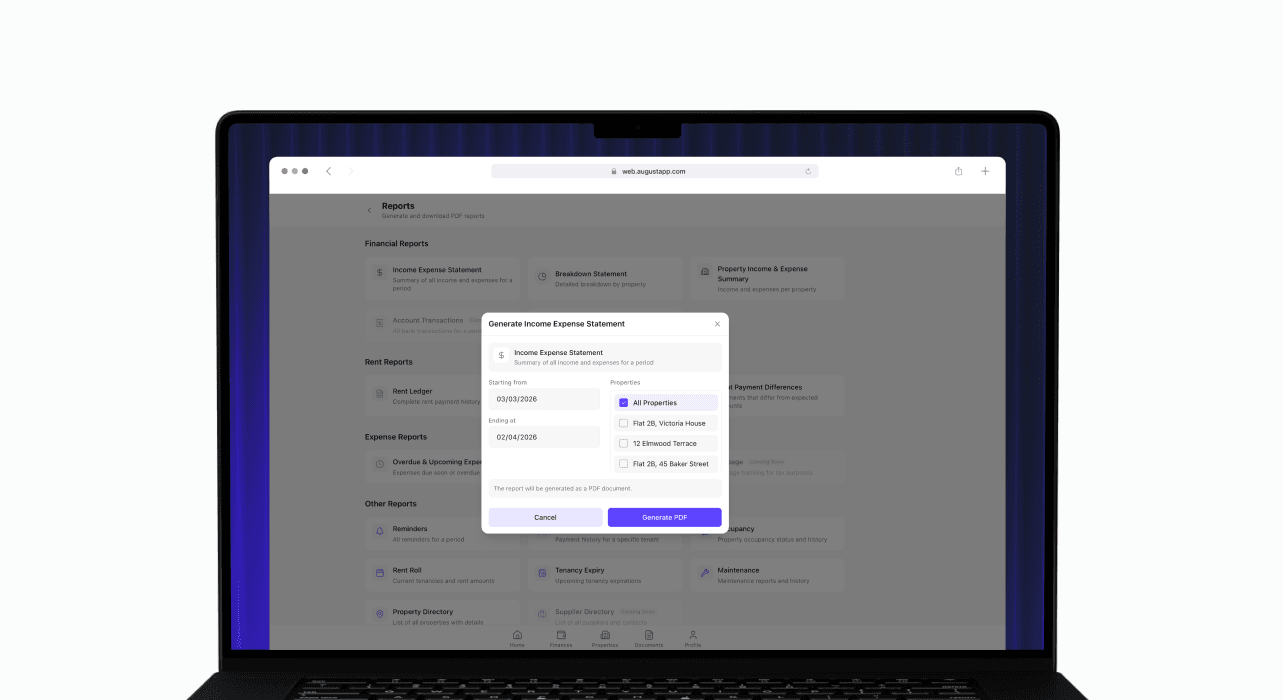
Report generation (Financial, Property and Tenancy)
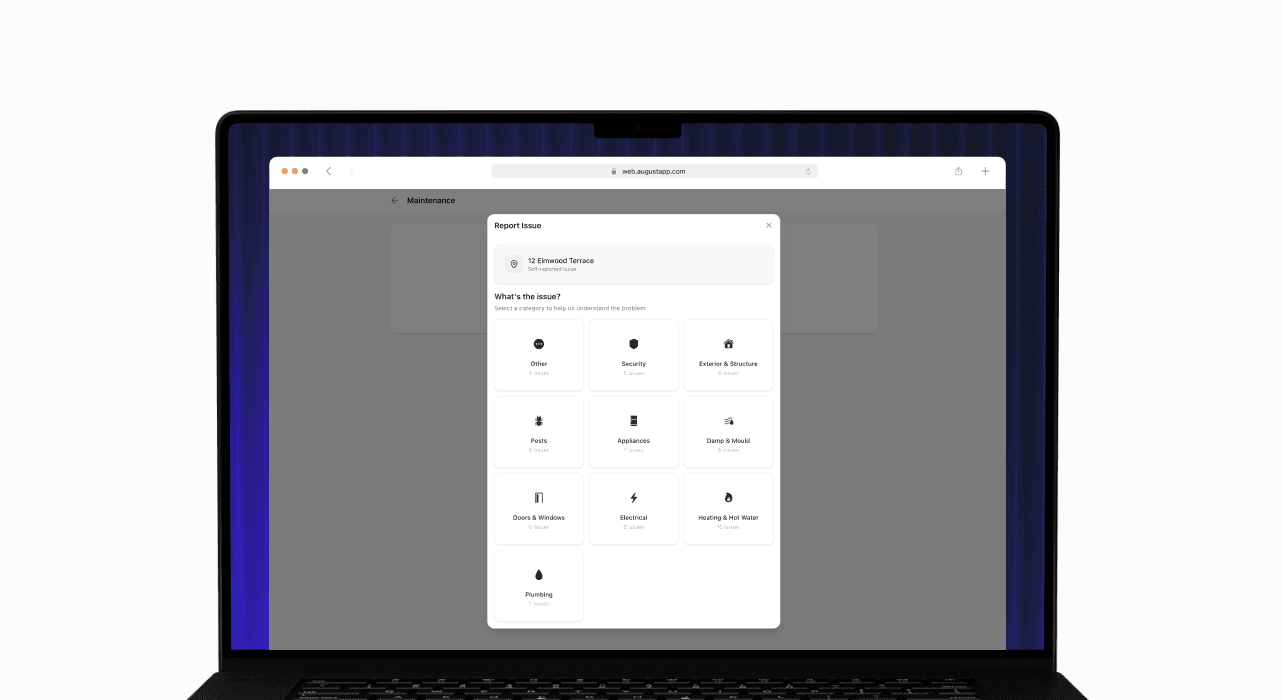
Maintenance Wizard
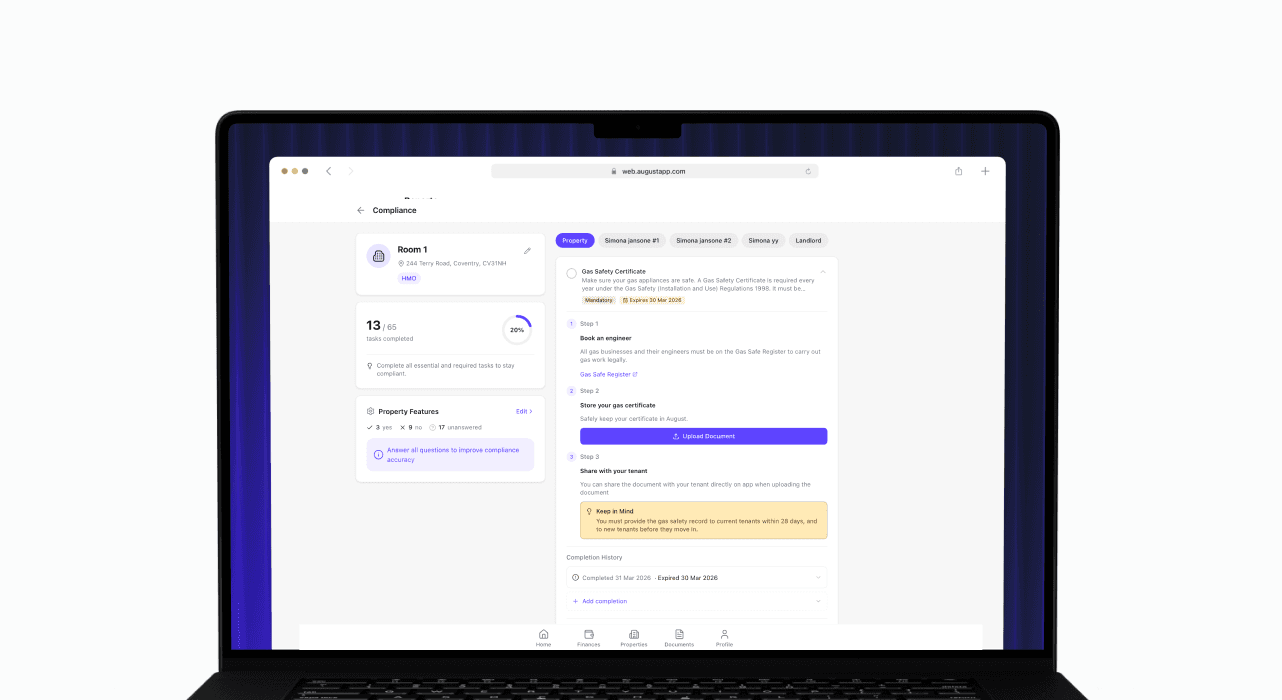
Compliance (version 2)
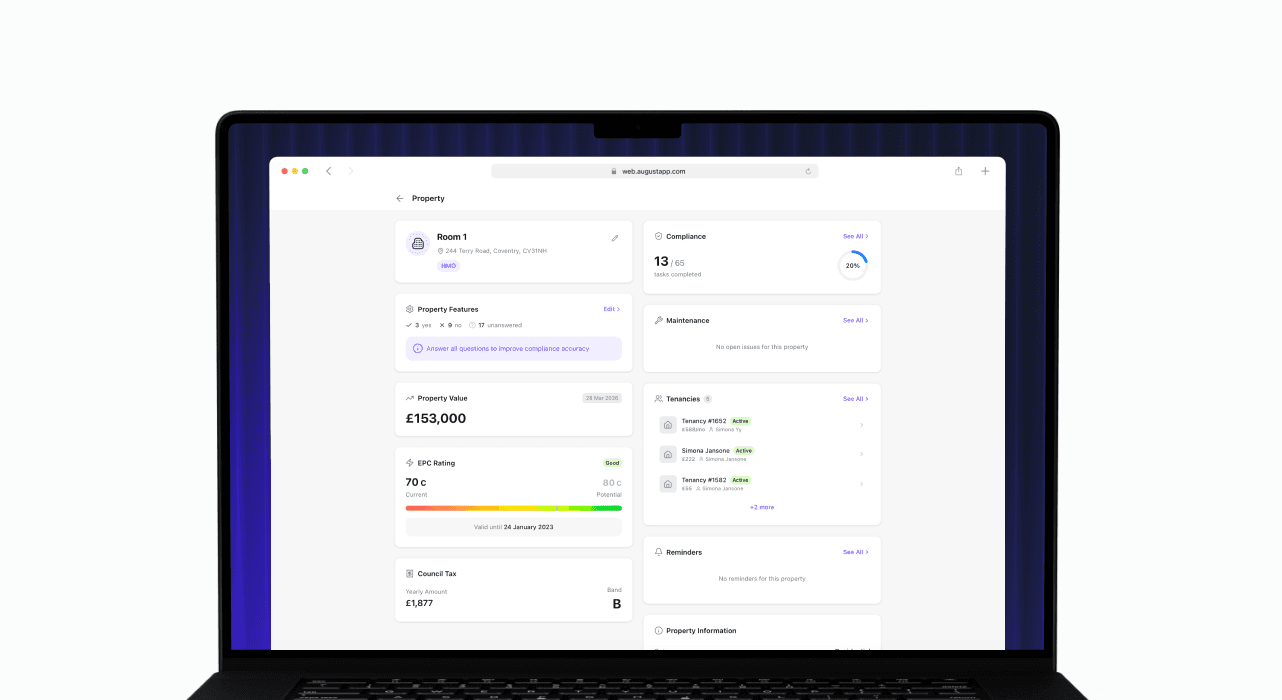
Property page redesign
Reports, Maintenance Wizard, and Property Page Redesign
This release brings PDF report generation, a new guided maintenance reporting experience, further compliance improvements, and a significant redesign of the property page, moving from a tab-based layout to a cleaner widget-based view.
What’s included
PDF report generation – You can now generate and download PDF versions of your Income/Expense Statement and Breakdown Statement directly from the app, making it easier to share financial records with accountants or keep for your own files.
Maintenance Wizard – A new guided maintenance reporting flow walks through diagnosing the issue step by step before a report is submitted. The wizard also incorporates property features, giving more relevant context to each report.
Compliance V2 improvements – Further refinements to the compliance experience, including UI improvements throughout and the ability to mark tasks as not applicable with a recorded reason, useful for properties where certain requirements do not apply.
Property page redesign – The property page has moved from a tab-based layout to a widget-based design, surfacing the information most relevant to you more directly and making it easier to navigate your property at a glance.
Property features – Property features are now accessible via a dedicated modal and widget, with impact hints to help you understand how each feature may affect your compliance obligations or management tasks.
Report generation (Financial, Property and Tenancy)
Maintenance Wizard
Compliance (version 2)
Property page redesign
Web 1.5
12 March 2026
Limits and upgrade banners
Limits and upgrade banners
This release brings PDF report generation, a new guided maintenance reporting experience, further compliance improvements, and a significant redesign of the property page, moving from a tab-based layout to a cleaner widget-based view.
What’s included
Plan limit indicators – August now surfaces your current usage against plan limits, giving you a clear picture of where you are before you hit a ceiling.
Upgrade banners – Contextual banners appear at the right moments to highlight what's available on higher tiers, making it easy to upgrade when the time is right.
Limits and upgrade banners
This release brings PDF report generation, a new guided maintenance reporting experience, further compliance improvements, and a significant redesign of the property page, moving from a tab-based layout to a cleaner widget-based view.
What’s included
Plan limit indicators – August now surfaces your current usage against plan limits, giving you a clear picture of where you are before you hit a ceiling.
Upgrade banners – Contextual banners appear at the right moments to highlight what's available on higher tiers, making it easy to upgrade when the time is right.
Web 1.4
23 February 2026
Financial Reports
Financial Reports
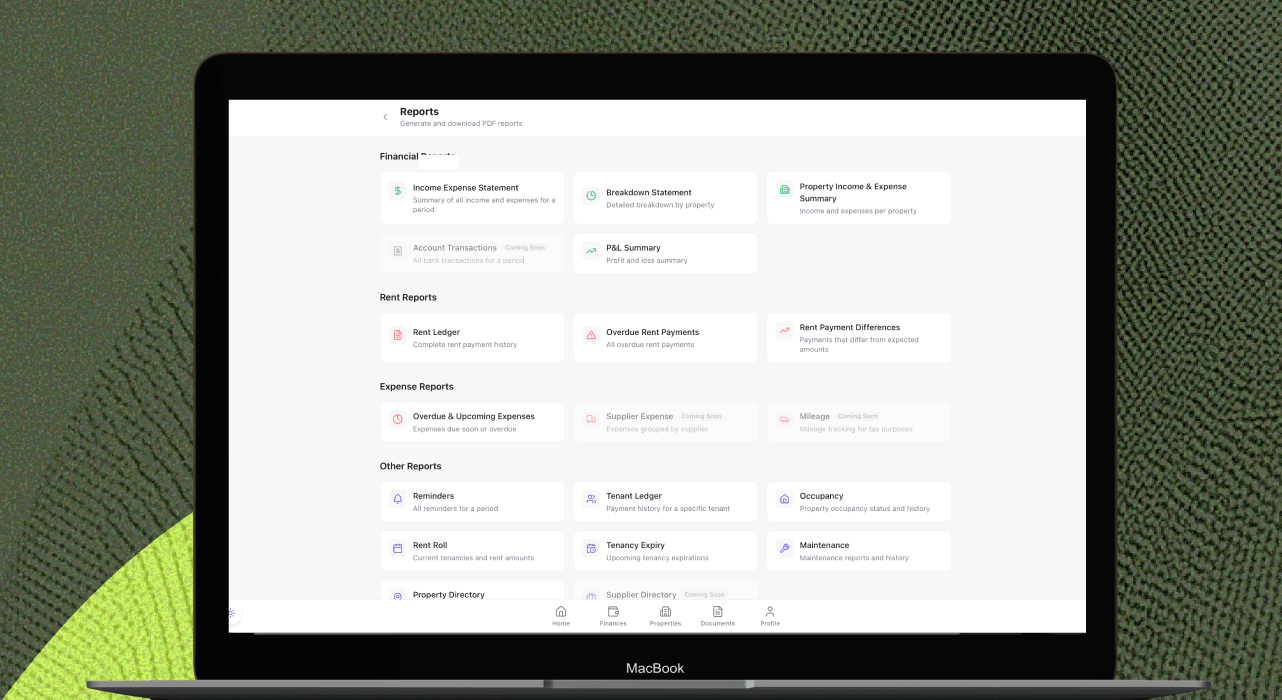
The Financial Reports update gives you clearer visibility into your portfolio performance and makes it easier to review and share key financial information. Generate useful reports in just a few clicks, and view them more smoothly with reports now opening in a new tab.
What’s included
Expanded Reports – Access financial reports including Income/Expense Statements, Breakdown Statements, and more, helping you understand performance and track your records more easily.
Improved PDF viewing – Reports now open in a new tab, making them easier to read, download, and review without interrupting your workflow.
Financial Reports
The Financial Reports update gives you clearer visibility into your portfolio performance and makes it easier to review and share key financial information. Generate useful reports in just a few clicks, and view them more smoothly with reports now opening in a new tab.
What’s included
Expanded Reports – Access financial reports including Income/Expense Statements, Breakdown Statements, and more, helping you understand performance and track your records more easily.
Improved PDF viewing – Reports now open in a new tab, making them easier to read, download, and review without interrupting your workflow.
Web 1.3
21 February 2026
Contacts, Tax and Bank Management
Contacts, Tax and Bank Management
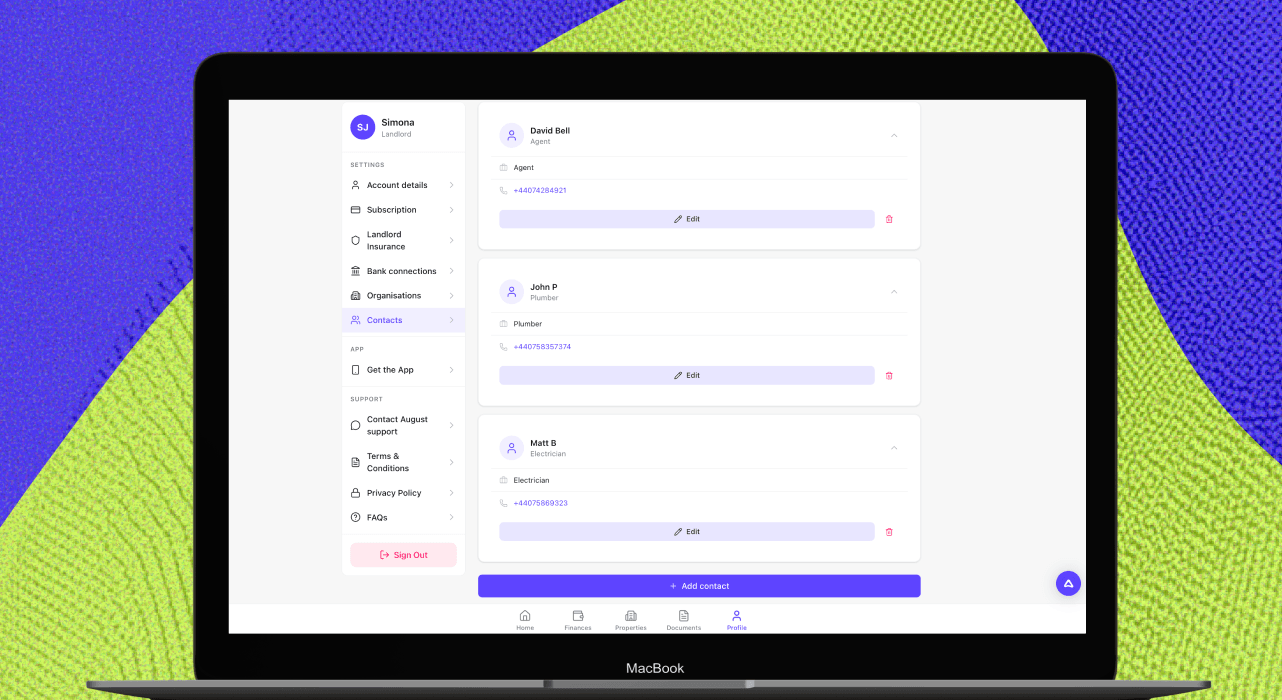
The Contacts, Tax and Bank Management update helps you keep records organised, stay on top of compliance, and manage your connected accounts more easily. You can now manage contacts and property notes, submit quarterly tax updates through HMRC integration, and make changes to your bank connections.
What’s included
Contacts Directory – Manage your contacts in one place, making it easier to store and find important details for contractors, agents, and other trusted services.
Property Notes – Add notes to your properties so key reminders and useful details are always easy to access.
Document Activity – See document activity linked to properties and tenancies, so you have better visibility of what has been added or updated.
Tenant Sharing – Share documents with tenants directly, making it easier to keep everyone informed and access the right paperwork.
Making Tax Digital (MTD) support – HMRC integration enables quarterly tax submissions and reporting, helping you prepare for and manage Making Tax Digital requirements more easily.
Bank connection management – You can now edit and delete bank connections, giving you more control over how your accounts are linked and maintained.
Contacts, Tax and Bank Management
The Contacts, Tax and Bank Management update helps you keep records organised, stay on top of compliance, and manage your connected accounts more easily. You can now manage contacts and property notes, submit quarterly tax updates through HMRC integration, and make changes to your bank connections.
What’s included
Contacts Directory – Manage your contacts in one place, making it easier to store and find important details for contractors, agents, and other trusted services.
Property Notes – Add notes to your properties so key reminders and useful details are always easy to access.
Document Activity – See document activity linked to properties and tenancies, so you have better visibility of what has been added or updated.
Tenant Sharing – Share documents with tenants directly, making it easier to keep everyone informed and access the right paperwork.
Making Tax Digital (MTD) support – HMRC integration enables quarterly tax submissions and reporting, helping you prepare for and manage Making Tax Digital requirements more easily.
Bank connection management – You can now edit and delete bank connections, giving you more control over how your accounts are linked and maintained.
Web 1.2
31 January 2026
Bank Connections and Setup Improvements
Bank Connections and Setup Improvements
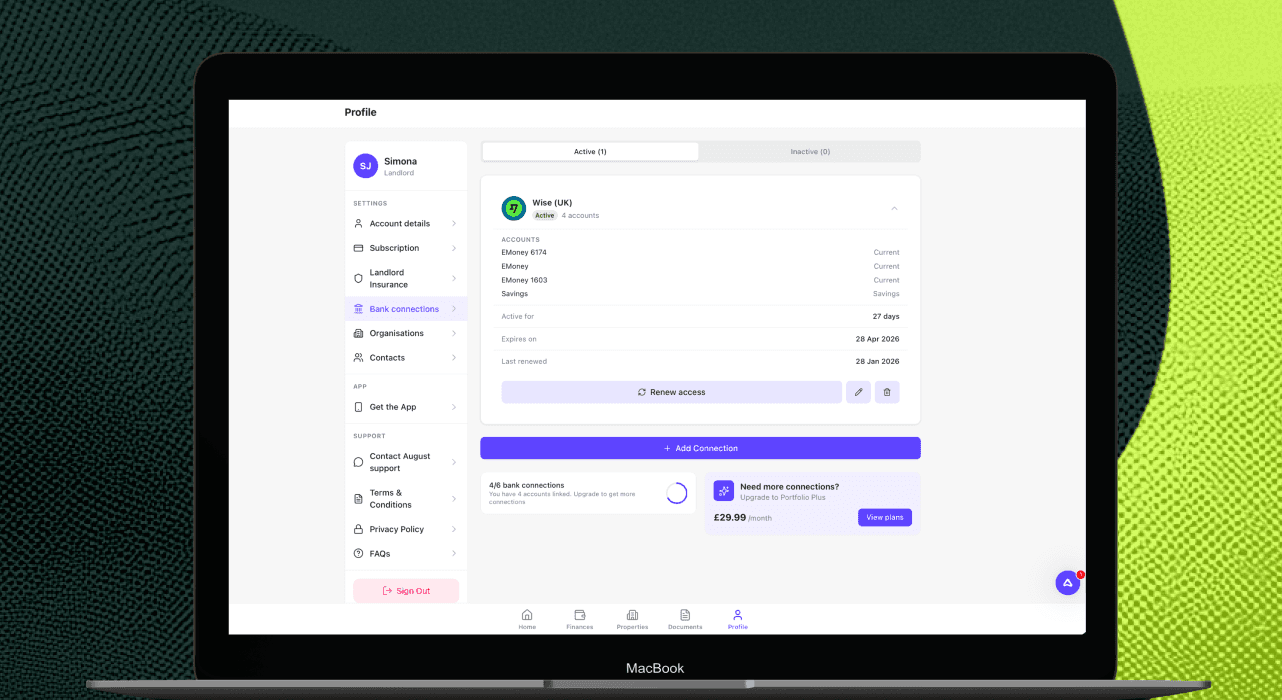
The Bank Connections and Setup improvements update makes onboarding smoother and brings the web experience closer to mobile. You can now connect a bank account through Plaid on web, use guided setup cards and capture richer property details from the start.
What’s included
Bank connections on web via Plaid - You can now link a bank account from the web app using Plaid, with the same core connection flow as mobile.
Setup cards - New setup cards guide users through key actions such as adding a property, adding a bank account and completing KYC, making onboarding clearer and easier to follow.
Expanded property details - Property setup now includes richer details and classifications, including options such as residential, office and shared ownership, helping records better reflect key property types.
Bank Connections and Setup Improvements
The Bank Connections and Setup improvements update makes onboarding smoother and brings the web experience closer to mobile. You can now connect a bank account through Plaid on web, use guided setup cards and capture richer property details from the start.
What’s included
Bank connections on web via Plaid - You can now link a bank account from the web app using Plaid, with the same core connection flow as mobile.
Setup cards - New setup cards guide users through key actions such as adding a property, adding a bank account and completing KYC, making onboarding clearer and easier to follow.
Expanded property details - Property setup now includes richer details and classifications, including options such as residential, office and shared ownership, helping records better reflect key property types.
Web 1.1
27 January 2026
Web for Desktop
Web for Desktop
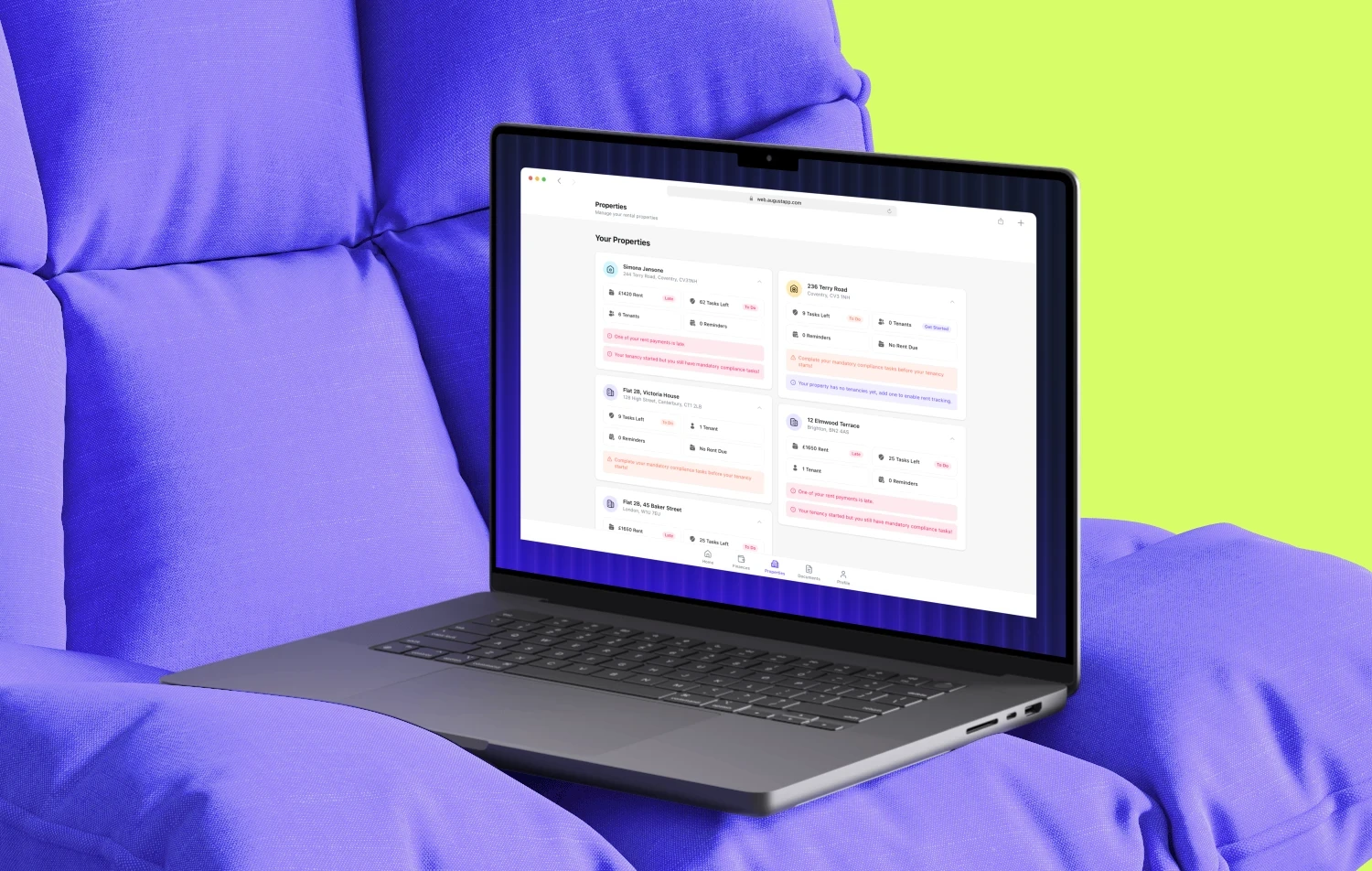
August now works on desktop, so you can manage your properties and tenancies from any web browser on your computer, with the full August experience optimised for larger screens.
Whether you’re doing monthly reviews at your desk or need to quickly check something on your phone, desktop web makes it easier to stay organised, move faster, and keep everything in sync.
Desktop web is built for how landlords work
Rental admin often happens on a computer: reviewing multiple properties, downloading documents, updating records, or preparing information for an accountant. Desktop web gives you more space, clearer visibility and a smoother workflow — without losing the convenience of mobile.
What’s included
Full desktop experience - All the features you already use in the August app are now available on desktop, redesigned for bigger screens so it’s easier to navigate and get things done efficiently.
Built for bigger portfolios - Manage multiple properties more effectively with better visibility across your entire portfolio, so you can spot what needs attention and stay on top of your admin.
Upload documents directly - Drag and drop documents from your computer straight into August — fast, simple, and a better way to keep paperwork organised.
Syncs with your phone - Seamlessly pick up where you left off. Start on desktop, continue on mobile, and vice versa — your account stays up to date across devices.
Get started
Open August in any web browser on your computer and sign in as normal. Everything syncs automatically with your phone, so you can work in the way that suits you.
If you’d like, I can also rewrite this into a more “product page” style with a hero headline, short intro, feature tiles, and a CTA button copy.
Web for Desktop
August now works on desktop, so you can manage your properties and tenancies from any web browser on your computer, with the full August experience optimised for larger screens.
Whether you’re doing monthly reviews at your desk or need to quickly check something on your phone, desktop web makes it easier to stay organised, move faster, and keep everything in sync.
Desktop web is built for how landlords work
Rental admin often happens on a computer: reviewing multiple properties, downloading documents, updating records, or preparing information for an accountant. Desktop web gives you more space, clearer visibility and a smoother workflow — without losing the convenience of mobile.
What’s included
Full desktop experience - All the features you already use in the August app are now available on desktop, redesigned for bigger screens so it’s easier to navigate and get things done efficiently.
Built for bigger portfolios - Manage multiple properties more effectively with better visibility across your entire portfolio, so you can spot what needs attention and stay on top of your admin.
Upload documents directly - Drag and drop documents from your computer straight into August — fast, simple, and a better way to keep paperwork organised.
Syncs with your phone - Seamlessly pick up where you left off. Start on desktop, continue on mobile, and vice versa — your account stays up to date across devices.
Get started
Open August in any web browser on your computer and sign in as normal. Everything syncs automatically with your phone, so you can work in the way that suits you.
If you’d like, I can also rewrite this into a more “product page” style with a hero headline, short intro, feature tiles, and a CTA button copy.

Your portfolio deserves better than a spreadsheet.
Join 3,000+ UK Landlords and Tenants who track compliance, collect rent, and manage all their properties from one dashboard.
No credit card required · Free for up to 2 properties · No commitment
Your portfolio deserves better than a spreadsheet.
Join 3,000+ UK Landlords and Tenants who track compliance, collect rent, and manage all their properties from one dashboard.
No credit card required · Free for up to 2 properties · No commitment
Your portfolio deserves better than a spreadsheet.
Join 3,000+ UK Landlords and Tenants who track compliance, collect rent, and manage all their properties from one dashboard.
No credit card required · Free for up to 2 properties · No commitment